
How do I set up and start my Cordless Drill
Created by Chris McHale, Modified on Fri, 26 Jun at 2:25 PM by Chris McHale
Quick Answer
To set up your cordless drill, fully charge the battery, fit the drill bit securely into the chuck, select the appropriate gear and torque setting, choose the rotation direction, then press the trigger to start drilling.
Tip: Always select your gear and torque settings before starting the drill.
Before You Start
Before using your cordless drill, make sure:
- The battery is fully charged
- The correct drill bit or screwdriver bit is fitted securely
- You are wearing suitable PPE, including safety glasses
- The workpiece is secure before drilling
Important: Never change the gear selector while the drill is running, as this may damage the gearbox.
How to Set Up Your Cordless Drill
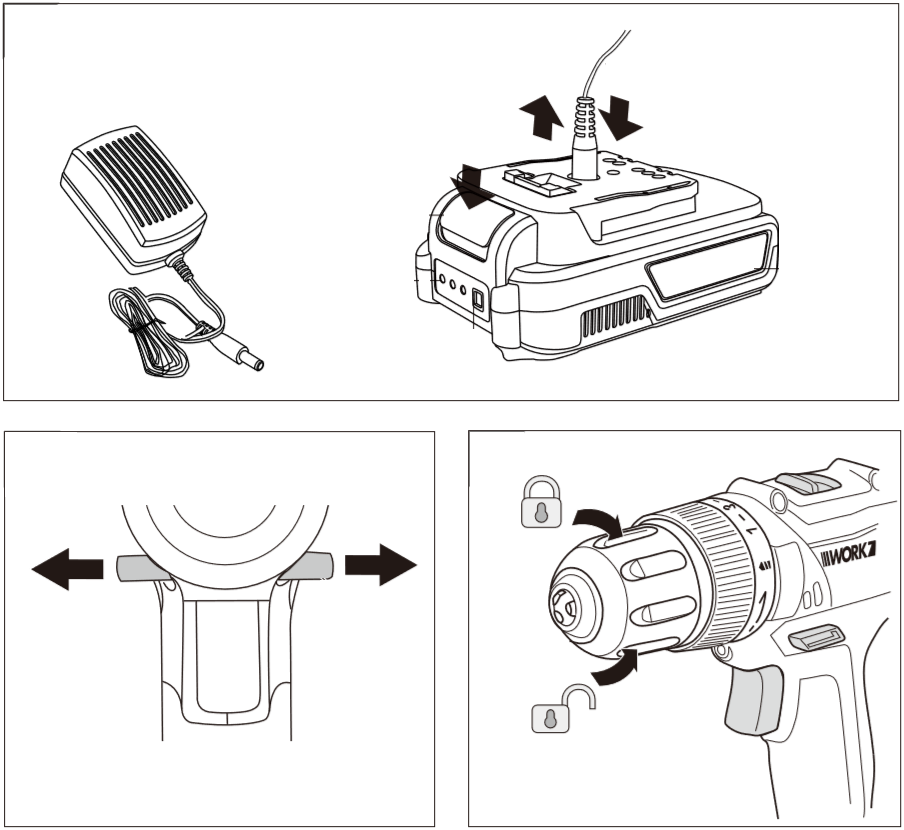
1. Charge the battery
Ensure the battery pack is fully charged before first use.
Charging times vary depending on the model. Refer to the Technical Data section of your user manual for the correct charging time.
For the D022 model:
- Set the forward/reverse switch to the middle (locked) position
- Remove the battery from the drill if fitted
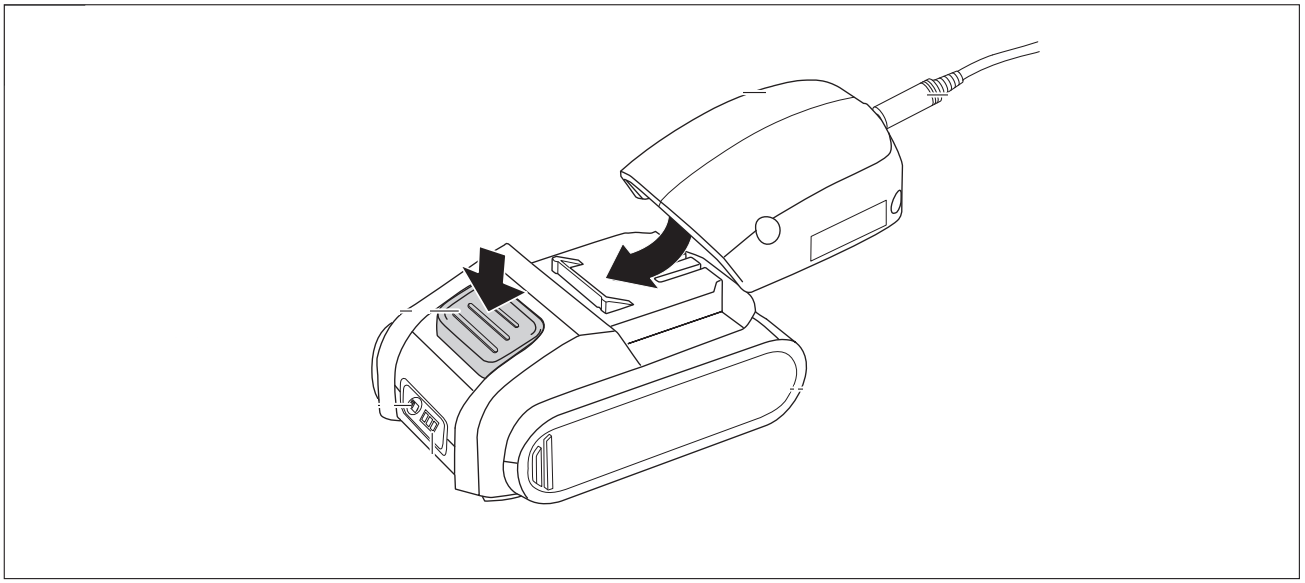
- Connect the charger lead to the battery pack
- Plug the charger into the mains
- Monitor the battery indicator lights:
- First light: Charging
- Second light: Approximately 40% charged
- Third light: Fully charged
- Charging takes approximately 60 minutes
- Once charged, slide the battery back into the drill until it clicks into place
Other models may use a slot-in charger or charging cradle.
2. Fit the drill bit
- Rotate the chuck anti-clockwise to open it
- Insert the drill bit or screwdriver bit fully into the chuck
- Rotate the chuck clockwise until the bit is securely clamped
Always check that the bit is firmly secured before use.
3. Select the gear
Your cordless drill features a two-speed gearbox.
Gear 1 (Low Speed / High Torque)
Use for:
- Large drill bits
- Wood
- Plastic
- Driving screws
Gear 2 (High Speed / Low Torque)
Use for:
- Small drill bits
- Metal
- Faster drilling
Move the gear selector on the top of the drill:
- Position 1 (towards the chuck)
- Position 2 (away from the chuck)
Important: Only change gears when the drill has completely stopped.
4. Adjust the torque
Use the torque adjustment ring behind the chuck.
- Lower settings are suitable for driving screws
- Higher settings are suitable for drilling
Select the lowest setting that completes the task without over-tightening screws.
5. Select the rotation direction
Use the forward/reverse selector to choose:
- Forward rotation for drilling and driving screws
- Reverse rotation for removing screws
The centre position locks the trigger and prevents accidental operation.
6. Start the drill
Before drilling:
- Check the bit is secure
- Wear appropriate PPE
- Ensure the workpiece is safely supported
To operate the drill:
- Press the trigger
- Apply gentle pressure to begin drilling
The drill features a variable-speed trigger:
- Press lightly for slower speeds
- Press further for higher speeds
Release the trigger to stop the drill.
Important Safety Tips
- Always release the trigger before inserting or removing the battery
- Never change gears while the drill is running
- Ensure the drill bit is securely clamped before use
- Use the correct drill bit for the material being drilled
- Remove the battery before changing accessories or carrying out maintenance
Frequently Asked Questions
Why won't my cordless drill start?
Check that the battery is fully charged, correctly fitted, the forward/reverse selector is not in the centre lock position, and the trigger is being pressed.
Which gear should I use?
Use Gear 1 for screwdriving and larger drill bits, and Gear 2 for smaller drill bits and drilling into metal.
What does the torque setting do?
The torque setting controls the turning force of the drill. Lower settings help prevent over-tightening screws, while higher settings are intended for drilling.
Can I change gears while drilling?
No. Always stop the drill completely before changing between Gear 1 and Gear 2.
Why does the drill run faster when I squeeze the trigger harder?
The drill has a variable-speed trigger, allowing you to control the drilling speed by how far you press the trigger.
Was this article helpful?
That’s Great!
Thank you for your feedback
Sorry! We couldn't be helpful
Thank you for your feedback
Feedback sent
We appreciate your effort and will try to fix the article